
APIが利用可能なプランについて
STARTER, PROFESSIONALプランでは無制限でご利用いただけます。
FREEプランでは一部を除き原則利用不可。BEGINNERプランでは100回までの制限付きで利用可能となります。
APIを使うために用意するもの
- APIを使うためには以下の2つが必要です。
- API key
- assistant_id(bot_id)
1. API keyの取得方法
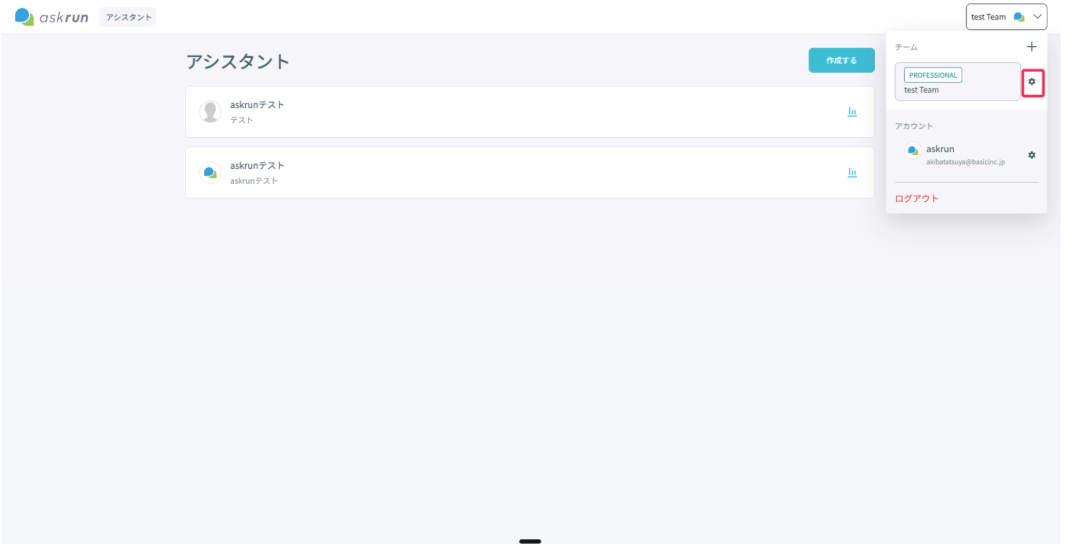
- 右上のチームのアイコンから歯車マークをクリックする。
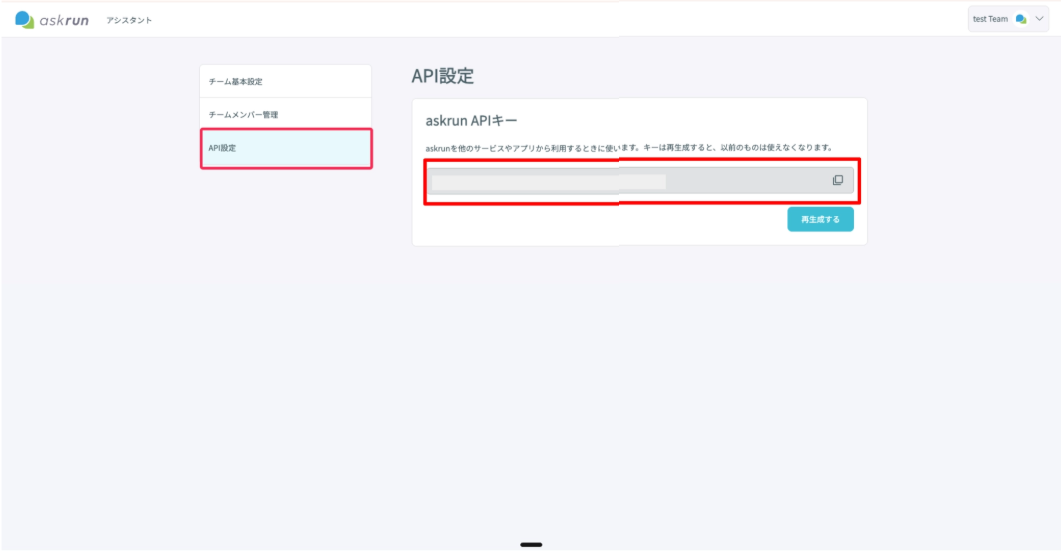
- サイドバーのAPI設定をクリックし、API keyを取得する。「再生成」をクリックするとAPI keyが再生成される。
3. assistant_id(bot_id)の取得方法
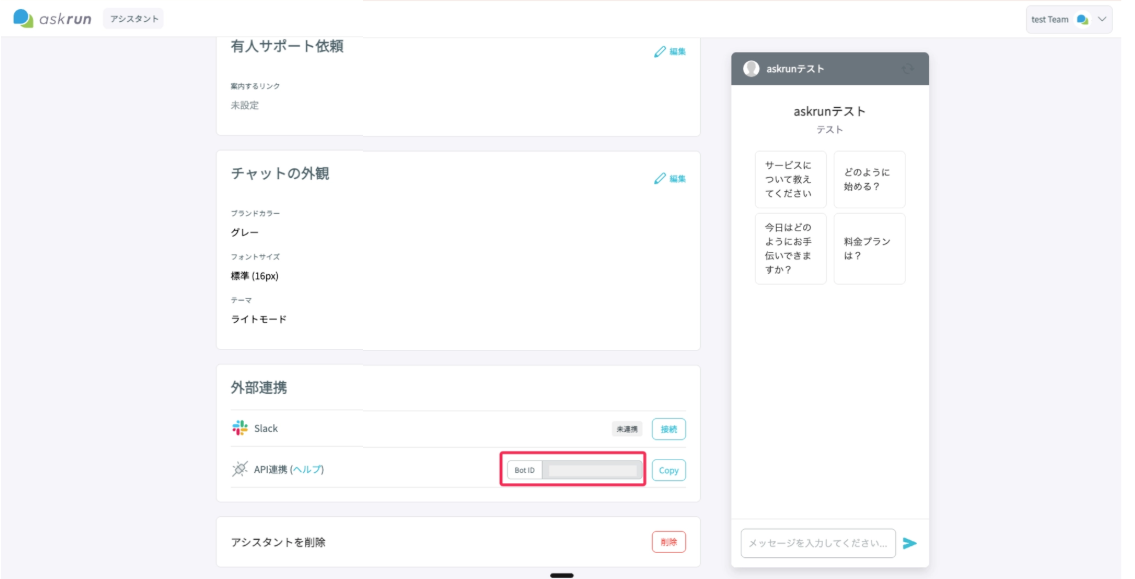
- アシスタントの設定画面に入るとAPI連携の部分から取得できる。
API仕様
共通仕様
-
Base Path:
/api/v1 -
認証:
Authorization: Bearer <TEAM_API_KEY> -
Content-Type:
-
JSON API:
application/json -
ファイルアップロード API:
multipart/form-data
-
-
レート制限:
-
chat-agent: 600 requests / minute -
search/document/assistant: 600 requests / minute
-
共通エラー
-
400 Bad Request: リクエスト不正(必須不足・形式不正) -
403 Forbidden: 認証エラーまたはteam_id不一致 -
404 Not Found:assistant_idやdocument_idが存在しない -
429 Too Many Requests: レート制限超過
1) POST /api/v1/chat-agent
チャット応答を取得します。thread_id を省略すると新規スレッドが作成されます。
Request (JSON)
{
  "assistant_id": 123,
  "message": "こんにちは",
  "thread_id": 456
}
-
assistant_id(required, integer) -
message(required, string, max 100000 chars) -
thread_id(optional, integer)
Response 200
{
  "event": "lookup_answer",
  "data": {
    "assistant_id": 123,
    "thread_id": 456,
    "message": "こんにちは",
    "answer": "お問い合わせありがとうございます。",
    "sources": [
      { "type": "url", "title": "料金プランについて", "url": "https://example.com/pricing" }
    ]
  }
}
cURL
curl -X POST "$BASE_URL/api/v1/chat-agent" \
  -H "Authorization: Bearer $API_KEY" \
  -H "Content-Type: application/json" \
  -d '{
    "assistant_id": 123,
    "message": "こんにちは"
  }'
2) POST /api/v1/search
アシスタントに紐づくナレッジからセマンティック検索を実行します。
Request (JSON)
{
  "assistant_id": 123,
  "query": "料金プラン",
  "top_k": 5,
  "type": "qa"
}
-
assistant_id(required, integer) -
query(required, string, max 1000 chars) -
top_k(optional, integer, 1-100, default:5) -
type(optional,null|file|url|qa, default:null)
Response 200
{
  "results": [
    {
      "document_id": 1001,
      "type": "URL",
      "content": "プランの詳細..."
    }
  ]
}
cURL
curl -X POST "$BASE_URL/api/v1/search" \
  -H "Authorization: Bearer $API_KEY" \
  -H "Content-Type: application/json" \
  -d '{
    "assistant_id": 123,
    "query": "料金プラン",
    "top_k": 5
  }'
3) POST /api/v1/documnt/url
注意: 実際の有効なエンドポイントは POST /api/v1/document/url です。
指定 URL をクロールしてドキュメントを追加します。
Request (JSON)
{
  "assistant_id": 123,
  "url": "https://example.com/help"
}
-
assistant_id(required, integer) -
url(required, http/https)
Response 201
{
  "document_id": 1002
}
cURL
curl -X POST "$BASE_URL/api/v1/document/url" \
  -H "Authorization: Bearer $API_KEY" \
  -H "Content-Type: application/json" \
  -d '{
    "team_id": 1,
    "assistant_id": 123,
    "url": "https://example.com/help"
  }'
4) POST /api/v1/document/qa
Q&A 形式のドキュメントを追加します。
Request (JSON)
{
  "assistant_id": 123,
  "question": "営業時間は?",
  "answer": "平日 9:00-18:00 です。"
}
-
assistant_id(required, integer) -
question(required, string, max 1000 chars) -
answer(required, string, max 5000 chars)
Response 201
{
  "document_id": 1003
}
cURL
curl -X POST "$BASE_URL/api/v1/document/qa" \
  -H "Authorization: Bearer $API_KEY" \
  -H "Content-Type: application/json" \
  -d '{
    "assistant_id": 123,
    "question": "営業時間は?",
    "answer": "平日 9:00-18:00 です。"
  }'
5) POST /api/v1/document/file
ファイルをアップロードしてドキュメントを追加します。
Request (multipart/form-data)
-
assistant_id(required) -
name(required, max 256 chars) -
file(required)
許可拡張子:
pdf,doc,html,csv,md,tex,txt
Response 201
{
  "document_id": 1004
}
cURL
curl -X POST "$BASE_URL/api/v1/document/file" \
  -H "Authorization: Bearer $API_KEY" \
  -F "assistant_id=123" \
  -F "name=利用規約" \
  -F "file=@./terms.pdf"
6) DELETE /api/v1/document
ドキュメントを1件削除します。
Request (JSON)
{
  "assistant_id": 123,
  "document_id": 1004
}
-
assistant_id(required, integer) -
document_id(required, integer)
Response 200
{
  "document_id": 1004
}
cURL
curl -X DELETE "$BASE_URL/api/v1/document" \
  -H "Authorization: Bearer $API_KEY" \
  -H "Content-Type: application/json" \
  -d '{
    "assistant_id": 123,
    "document_id": 1004
  }'
7) PUT /api/v1/assistant
アシスタントの指示文(instruction)を更新します。
Request (JSON)
{
  "assistant_id": 123,
  "instruction": "回答は必ず日本語で、簡潔に。"
}
-
assistant_id(required, integer) -
instruction(required, string, 空文字可)
Response 200
{
  "assistant_id": 123
}
cURL
curl -X PUT "$BASE_URL/api/v1/assistant" \
  -H "Authorization: Bearer $API_KEY" \
  -H "Content-Type: application/json" \
  -d '{
    "team_id": 1,
    "assistant_id": 123,
    "instruction": "回答は必ず日本語で、簡潔に。"
  }'
8) GET /api/v1/assistants
Bearer API キーに紐づくチームのアシスタント一覧を取得します。
Request
クエリパラメータ・リクエストボディはありません。
Response 200
{
  "assistants": [
    {
      "id": 123,
      "name": "サポートアシスタント",
      "description": "問い合わせ対応用",
      "instructions": "回答は必ず日本語で、簡潔に。"
    }
  ]
}
cURL
curl -X GET "$BASE_URL/api/v1/assistants" \
  -H "Authorization: Bearer $API_KEY" \
  -H "Content-Type: application/json" \
  -H "Accept: application/json"
9) GET /api/v1/assistant
指定したアシスタントの詳細を取得します。team_id と assistant_id をクエリパラメータで指定します。
Request (Query Parameters)
assistant_id(required, integer)
Response 200
{
  "assistant": {
    "id": 123,
    "name": "サポートアシスタント",
    "description": "問い合わせ対応用",
    "instructions": "回答は必ず日本語で、簡潔に。"
  }
}
cURL
curl -X GET "$BASE_URL/api/v1/assistant?assistant_id=123" \
  -H "Authorization: Bearer $API_KEY" \
  -H "Content-Type: application/json" \
  -H "Accept: application/json"
備考
- 認証ヘッダーがない場合は
403({"error":"Unauthorized access"})を返します。